



Text prompts can generate fresh video ideas, but they leave many visual details open to interpretation. Reference-to-video uses visual or multimodal reference assets to anchor the characters, products, style, motion, or other details you want to preserve. Add a focused motion prompt, and you can produce related clips with a more consistent visual direction for social posts, product stories, and campaign concepts.
Reference to Video vs. Image to Video vs. Text to Video
AKOOL offers text-to-video, image-to-video, and reference-to-video workflows. They can all create AI video, but they use inputs differently and solve different creative problems.
Reference to video AI uses approved visual or audio assets to guide a new generation. In AKOOL, you can use multiple reference materials to define the details that should remain recognizable, including a character’s appearance, a product’s packaging, campaign art direction, movement cues, or sound.
Image to Video is useful when one still image needs motion. Reference to Video is the stronger fit when a connected set of clips needs character consistency, product consistency, and a stable visual system.
How to Use Reference to Video in AKOOL
AKOOL Reference to Video helps creators and marketing teams turn approved creative assets into consistent AI video. The workflow separates the visual details that should stay stable from the motion details that can change from clip to clip.
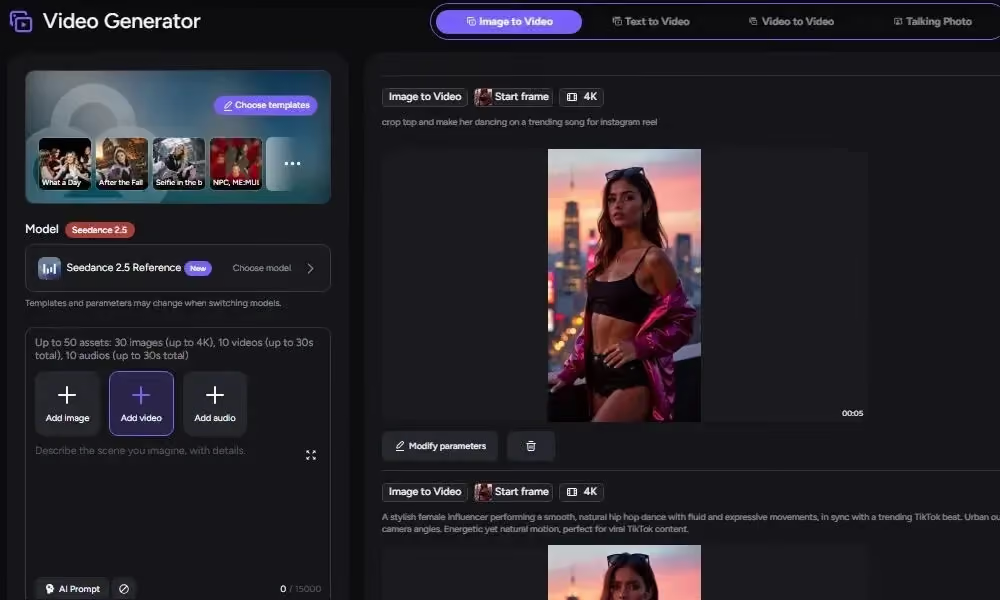
- Open AKOOL Reference to Video and choose a reference-capable model. The available upload options and generation controls can differ by model.
- Upload the approved reference assets. Add a product image, character image, style frame, video reference, or audio reference based on what needs to remain consistent in the final clip.
- Write a motion-focused prompt. Describe the action, camera movement, lighting, and atmosphere. Keep the prompt focused on what changes over time, while the references provide the visual identity.
- Adjust the available AKOOL controls for your selected model. Depending on the model, you may be able to refine camera movement, shot type, atmosphere, lighting, effects, duration, aspect ratio, output count, and negative prompts.
- Generate the clip and compare it with the approved references. Review character consistency, product accuracy, motion quality, and style consistency before producing more campaign variations.
When Should You Use a Reference Instead of a Text Prompt Alone?
Use a reference image when key visual details need to stay recognizable from one clip to the next. A text-only prompt is useful for open-ended experimentation, while a reference-led workflow is better suited to assets that already have an approved look.
Choose a reference when you need to retain:
- A recurring character’s wardrobe, face, and color palette
- A product’s packaging, shape, materials, or logo placement
- A campaign’s approved lighting, art direction, and composition
- A hero image that needs motion for a Reel, Short, or paid social asset
For example, a skincare team can upload an approved product image and prompt: “A slow camera push toward the bottle as soft morning light moves across the glass. A single water droplet rolls down the surface.” The image establishes the product and scene. The prompt directs the animation.
This approach is useful when visual consistency matters as much as creative novelty. It helps you define the elements that should remain stable before experimenting with motion.
Choose Reference Images That Show Style, Character, and Composition Clearly
A focused set of visual references gives AKOOL clearer creative direction. Your assets do not need to be finished commercials, yet they should make the character, product, and campaign style easy to identify before you generate a consistent AI video.
Use images that clearly communicate style, subject, and composition.
For a character, choose a sharp image with clear facial features, wardrobe details, and lighting. For a product, use an approved packshot where the product is large enough in frame. For stylized artwork, preserve the colors, textures, and objects that make the visual identity recognizable.
Avoid low-resolution images, small subjects, crowded collages, and scenes with several competing focal points. A busy reference can cause the model to distribute attention across details that are not important to the final clip.
Use an approved image to create a directed video clip and reserve the prompt for motion, camera direction, and atmosphere. This separation makes each iteration easier to evaluate because you can see which change affects the final clip.
Use Visual References and Prompts for Consistent AI Video
A reference image establishes the visual identity. The prompt should explain what changes over time. Keep it focused on actions and cinematic direction that fit the scene already shown.
A practical prompt structure is:
Subject action + camera movement + environmental motion + mood
For example:
“The runner takes two slow steps forward; medium handheld shot; wind moves her jacket and hair; warm documentary lighting.”
This gives AKOOL a specific motion brief while the visual references continue to guide the character, clothing, composition, and other details that should remain stable.
Keep movement plausible for the source material. A portrait can blink, smile, turn slightly, or react to a gentle breeze. A product can rotate slowly, catch moving highlights, or sit beside rippling water. Large scene changes and fast action sequences introduce extra variables, which can reduce visual continuity.
Use practical prompting tips for reference-guided AI video clips to describe the scene, motion, and emotion clearly. Action words such as “walking,” “turning,” “laughing,” and “blinking” give the model a defined movement. Add camera direction only when it supports the shot, such as “slow push-in,” “locked-off shot,” or “gentle orbit.”
Test one change at a time. Keep the same reference and action while trying a new camera movement. Then preserve the preferred camera movement while changing the action. This gives you a clearer view of which prompt details improve the result.
Keep Characters, Products, and Visual Style More Stable Across Clips
Consistency comes from a repeatable production process. Once you identify a successful reference and prompt combination, document the elements that define it before producing a larger batch.
Keep a simple production record with:
- The approved reference image and file version
- The selected model and available settings
- The motion prompt
- The target duration, aspect ratio, and publishing channel
- Details that should remain fixed in future variations
For character-led series, create a compact asset sheet that includes the preferred portrait, wardrobe, accessories, background style, and emotional range. Reuse the approved source image or closely matched versions across related clips. This approach supports recurring characters in creator content, explainers, and short narrative scenes.
For product content, keep the approved packshot as the main reference when product recognition is important. Review every output before publication. Fine-print copy, labels, legal disclosures, and exact logo treatment should be added or checked during post-production, where your team can control them precisely.
Use the available motion controls in AKOOL to direct movement while the reference assets guide the visual identity. Models can interpret the same reference set differently, so test your approved assets before producing a larger campaign.
Use only images, people, artwork, and brand assets that you own or have permission to use. Obtain appropriate consent for recognizable individuals and follow your organization’s disclosure and content-use policies.
AKOOL Test: One Product Concept, Three Generation Methods
To test how visual references and prompt detail affect a product video, we used the same pale blue skincare bottle concept across three AKOOL generations. The text-only version used a written prompt without a reference asset. The other two versions used the same approved bottle reference, with either a simple or detailed motion prompt.
Test Inputs
Result 1: Text Only
The text-generated video depicts a blue glass skincare bottle positioned horizontally, featuring a distinct close-up perspective. The overall visual style is characteristic of beauty products; the warm color palette and horizontal composition lend the image a distinct advertising aesthetic. However, a rendering error occurs where water droplets slide from the inside of the bottle to the outside, thereby undermining the image's credibility as a beauty advertisement.
Result 2: Reference + Simple Prompt
The simple reference-guided result retains the upright, pale blue bottle body, cylindrical silhouette, cap, and clean, aesthetically pleasing composition. It conveys a sense of a slow, advancing camera movement, with water droplets gliding smoothly down the inside of the bottle.
Result 3: Reference + Detailed Prompt
The detailed reference-guided result closely mirrors the approved reference for the bottle's initial form while retaining the same pale blue tones and environmental setting. In the video, the camera pushes in more slowly, and a water droplet slides down the right side of the bottle, leaving behind a massive, gel-like trail.
Comparison
This test shows why visual references are valuable for product consistency in AI video. The text-only output interpreted the product concept freely, while both Reference to Video tests stayed closer to the approved bottle design. In this example, the detailed prompt delivered the most dependable result. Before scaling a campaign, run a reference-guided test in AKOOL and review the final frames for product shape, packaging details, motion quality, and style consistency.
Use Better References to Create More Predictable AI Videos
Use one approved reference set to define the subject, product details, and visual style. Then generate two reference-guided versions in AKOOL with one motion detail changed. Compare character consistency, product consistency, motion quality, and style consistency before saving the stronger setup for future clips.

