


Introduction to Seedream 5.0 Lite
Seedream 5.0 Lite is ByteDance’s latest text‑to‑image AI model, designed to move AI images from “fun experiments” to production‑ready content.
Compared with earlier Seedream versions, Seedream 5.0 Lite adds:
- Deep multimodal reasoning – it can “think through” prompts, diagrams, and concepts instead of just matching keywords
- Real‑time web search – it pulls up‑to‑date information so visuals align with current events, trends, and data
- Multi‑reference image support – up to 14 reference images for consistent characters, products, and styles across many outputs
- High‑fidelity generation and precise editing – sharper images, stronger text rendering, and controllable image‑to‑image editing for real workflows
High‑ranking reviews from platforms like Higgsfield and Freepik highlight Seedream 5.0 Lite as a production‑grade AI image generator for campaign systems, product series, technical diagrams, and character‑driven visuals not just one‑off “cool” images.
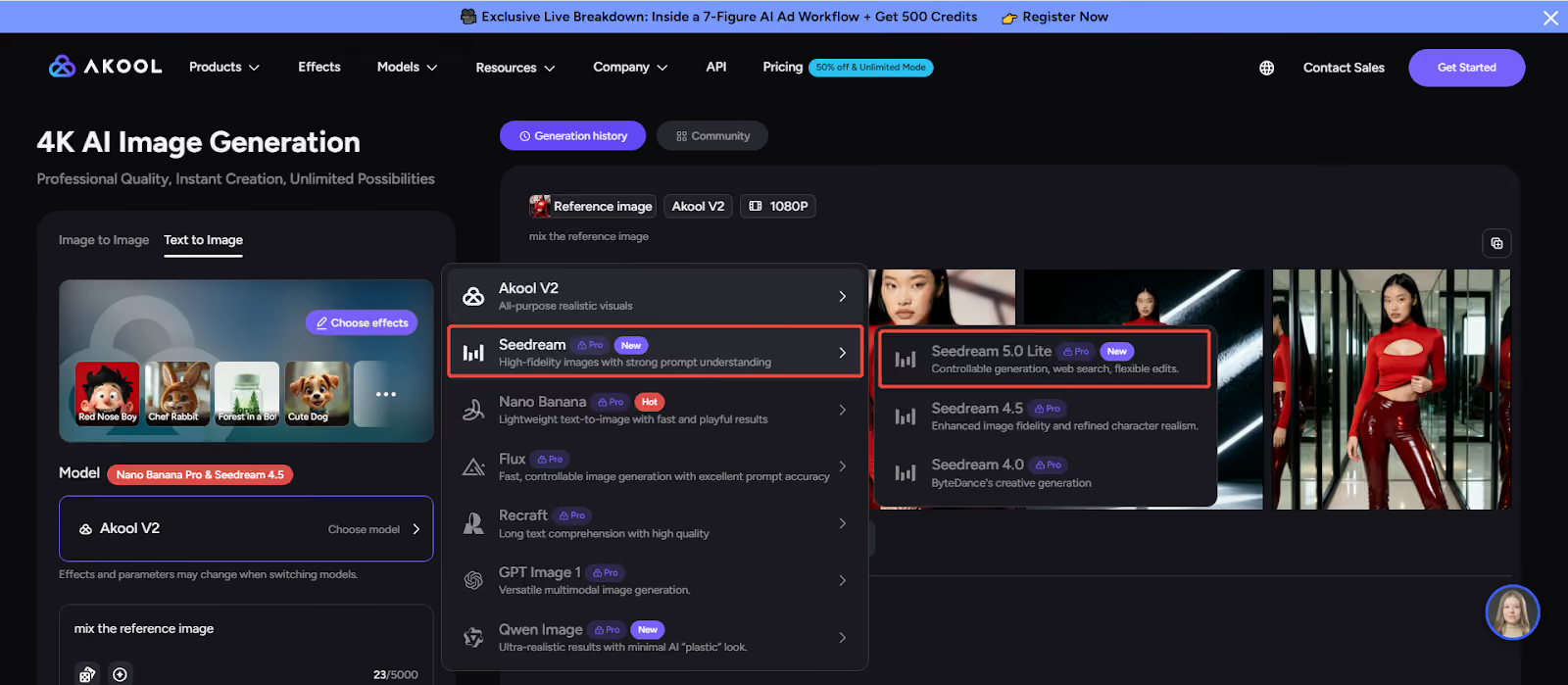
Seedream 5.0 Lite is already live through ByteDance’s own endpoints and partner platforms. Akool has begun rolling out the Seedream 5.0 family into its image model lineup, so Lite‑powered workflows will be available to Akool creators as that integration matures.
Key Features and Major Upgrades in Seedream 5.0 Lite
1. Deep Reasoning and Semantic Understanding
Seedream 5.0 Lite is built to understand intent, not just surface words.
- Performs multi‑step reasoning across domains like biology, architecture, geography, and data visualization
- Handles complex spatial relationships, multi‑object scenes, and abstract moods with far fewer hallucinations or missing details
- Interprets prompts as briefs (“what the image must communicate”) rather than random style mixes
Official benchmarks show a strong jump in instruction following, reasoning, and edit consistency versus previous Seedream generations, especially in office, learning, and marketing scenarios.
For teams, this means fewer retries and more usable images on the first pass.
2. Real‑Time Web Search and World Knowledge
One of Seedream 5.0 Lite’s biggest advances is online retrieval:
- Integrates real‑time web search so it can reflect current events, pricing, charts, logos, and popular aesthetics
- Generates visuals that match up‑to‑date trends instead of being locked to the model’s training cut‑off
- Supports tasks like weather‑aware posters, recent box office summaries, or data‑driven charts based on live information
High‑ranking reviews call out this “web‑aware” behavior as a key reason Seedream 5.0 Lite stands out for social media marketing, timely campaigns, and news‑adjacent content.
3. Multi‑Reference Control and Identity Consistency
Seedream 5.0 Lite is optimized for identity and feature preservation—critical for brand and character work.
- Supports up to 14 reference images in a single generation, letting you control subject identity, style, layout, and lighting at the same time
- Maintains character and subject consistency across many images: faces, clothing, props, and styling remain stable even across different poses and angles
- Reduces “identity drift” so campaign systems, product series, and recurring characters actually look like the same entity across outputs
Freepik and Higgsfield both emphasize Seedream 5.0 Lite’s strength in campaign asset production, character‑based storytelling, and product set imagery because of this consistency.
4. High‑Fidelity Images and Better Typography
Seedream 5.0 Lite is tuned for professional‑grade image quality:
- High‑resolution outputs (up to ~3K in some implementations) with clean edges and balanced lighting
- Strong text rendering and bilingual typography (English + Chinese), with clearer spacing, better hierarchy, and improved small‑text readability
- More reliable poster‑style compositions with intentional layout and white space, making it suitable for marketing creatives, social graphics, decks, and infographics
In short, Seedream 5.0 Lite is built for visuals that need to ship, not just impress on social.
5. Advanced Image Editing and Local Control
Beyond generation, Seedream 5.0 Lite acts as a powerful image editing model:
- Unified architecture for generation + editing: text‑to‑image, image‑to‑image, and example‑based editing run through the same engine
- Language‑based editing lets you change lighting, backgrounds, focus, or elements using plain instructions (“turn the background into a night cityscape,” “blur the background, keep the subject sharp”)
- Brush and mask selection allow local edits while keeping non‑edited regions stable—“point and change” editing that behaves more like a human retoucher
This makes Seedream 5.0 Lite a strong fit for production workflows where you need to refine a good base image instead of starting over with every small change.
How to Use Seedream 5.0 Lite in Akool
Seedream 5.0 Lite is already live across ByteDance’s ModelArk / BytePlus ecosystem and several partner fronts such as Higgsfield, Freepik, and FAL.
Akool has added the Seedream 5.0 family to its model catalog and has publicly previewed deeper Seedream integration for professional AI visual creation.
Based on how Seedream 4.5 and Seedream 5.0 are wired into Akool’s Image Generator, here’s the practical workflow you can expect as Seedream 5.0 Lite support lands:
1. Open Akool’s Image Generator and Select Seedream
- Log in to Akool.
- Go to the Image Generator under the “Models” or “Image” section.
- From the model list (Seedream, Flux, Nano Banana, Qwen, etc.), choose Seedream 5.0 when the Seedream 5.0 Lite–powered option is available.
Akool partners with top model providers like ByteDance, so Seedream 5.0 Lite will appear here as part of the Seedream family.
2. Add Prompt and Optional Reference Images
Seedream 5.0 Lite works best with clear, structured prompts and references:
- Write a prompt that describes subject, purpose, layout, and mood
- Example: “Campaign hero image of a minimalist skincare bottle on a marble pedestal, soft daylight, room for headline at top, clean modern design.”
- Upload reference images if you need consistency:
- Brand style frames
- Product photos
- Previous campaign visuals
Akool already supports reference‑based workflows for Seedream models, so you can expect a similar interface: image upload slots + text prompt field.
3. Generate, Edit, and Iterate
With Seedream 5.0 Lite selected:
- Click Generate to create first‑pass images.
- Use Seedream 5.0 Lite’s editing options (image‑to‑image, masked edits, style adjustments) to refine the best candidate instead of starting from zero.
- For campaigns, run multi‑reference generations to keep characters and products consistent across a whole set of assets.
Because Akool already exposes Seedream models through a simple “select model → input prompt → generate image” flow, using Seedream 5.0 Lite there will feel familiar but more powerful.
4. Export for Your Channels
Once you’re happy with the results:
- Export images in the sizes and formats you need for:
- Marketing campaigns and ads
- Social posts and content packs
- Presentations, reports, and educational materials
- E‑commerce product visuals
Seedream 5.0 Lite’s high‑resolution outputs and strong typography make it especially useful for posters, banners, hero graphics, and multi‑asset campaign systems.
Conclusion
Seedream 5.0 Lite is more than “Seedream 4.x but sharper.” It’s a new class of AI image model that combines:
- Deep reasoning and semantic accuracy for prompts
- Real‑time web search and world knowledge
- Multi‑reference control for identity‑true campaigns and character systems
- High‑fidelity, typography‑friendly images
- Advanced, controllable image editing for real production workflows
For marketers, designers, and creative teams, that means less time wrestling with prompts and more time building cohesive, shippable visual systems.
As Akool rolls Seedream 5.0 Lite into its AI visual creation stack, you’ll be able to use this model directly inside your existing Akool image generator workflows for campaigns, product visuals, social content, and beyond.
👉 Log in to Akool, watch for the Seedream 5.0 model family, and be ready to test Seedream 5.0 Lite for high‑fidelity AI image generation, smart image editing, and production‑ready content generation as soon as it appears in your model list.


