



TikTok Shop Is Now Live on Akool: One-Click AI Videos for Sellers
Introduction to TikTok Shop Integration
TikTok has become one of the most powerful platforms for social commerce, and TikTok Shop turns that attention into direct sales by letting users discover and buy products without leaving the app.
Now, Akool is available on TikTok Shop, which means you can use Akool’s AI video generator, image to video, and talking avatar tools directly in your TikTok Shop workflow.
Instead of manually filming and editing every product video, you can:
- Log in to Akool TikTok Shop
- Turn existing product images into scroll‑stopping videos or talking avatars
- Post directly to TikTok Shop in a single flow
This integration is built for sellers, brands, and creators who want to sell more on TikTok Shop with less friction and far less production time.
Key Features & Major Benefits
1. AI Product Videos from Simple Images
With the Akool TikTok Shop integration, you can use image to video AI to transform standard product photos into engaging short videos:
- Show the product from multiple angles using AI animation
- Add subtle camera motion, zooms, and framing
- Make your catalog look dynamic instead of static
This is ideal for:
- TikTok Shop product detail pages
- In‑feed shoppable videos
- Spark Ads and promotional posts that need visuals fast
You no longer need a full studio setup to get high‑quality product video—just an image and Akool’s AI video creation.
2. Talking Avatar Product Guides
Beyond image‑to‑video, Akool lets you turn product photos, brand images, or character art into talking avatar videos directly connected to your TikTok Shop catalog:
- A virtual host can explain product benefits
- A brand character can introduce offers or bundles
- A talking avatar can answer common questions in a friendly format
Because this runs inside the Akool TikTok Shop integration, you can generate these AI talking videos and send them straight to TikTok Shop, helping potential buyers understand products faster and with more personality.
3. Direct, One‑Click Publishing to TikTok Shop
The biggest upgrade is the end‑to‑end connection:
- Create AI product videos in Akool
- Instantly publish them to your TikTok Shop listings or video feed
- Keep everything aligned with your actual inventory and product pages
This tight integration reduces:
- Manual uploading and downloading
- File handling between tools
- The risk of mismatched products vs. media
In short, you get a streamlined TikTok Shop content pipeline powered by Akool.
4. Faster Social Commerce Content at Scale
Because all you need is an image and a short prompt, this setup is perfect for:
- Sellers with large catalogs who need many product videos
- Agencies managing multiple TikTok Shops
- Brands testing many creative variations for TikTok ads and organic posts
Akool’s AI video generator does the heavy lifting so you can focus on messaging, offers, and optimization—not on editing timelines.
How to Use TikTok Shop in Akool
Akool’s TikTok Shop integration is designed to be simple and fast. Here’s the full Akool TikTok Shop workflow:
1. Log In to Akool TikTok Shop
- Go to the Akool TikTok Shop entry point.
- Sign in with your Akool account and make sure you have access to the TikTok Shop integration.
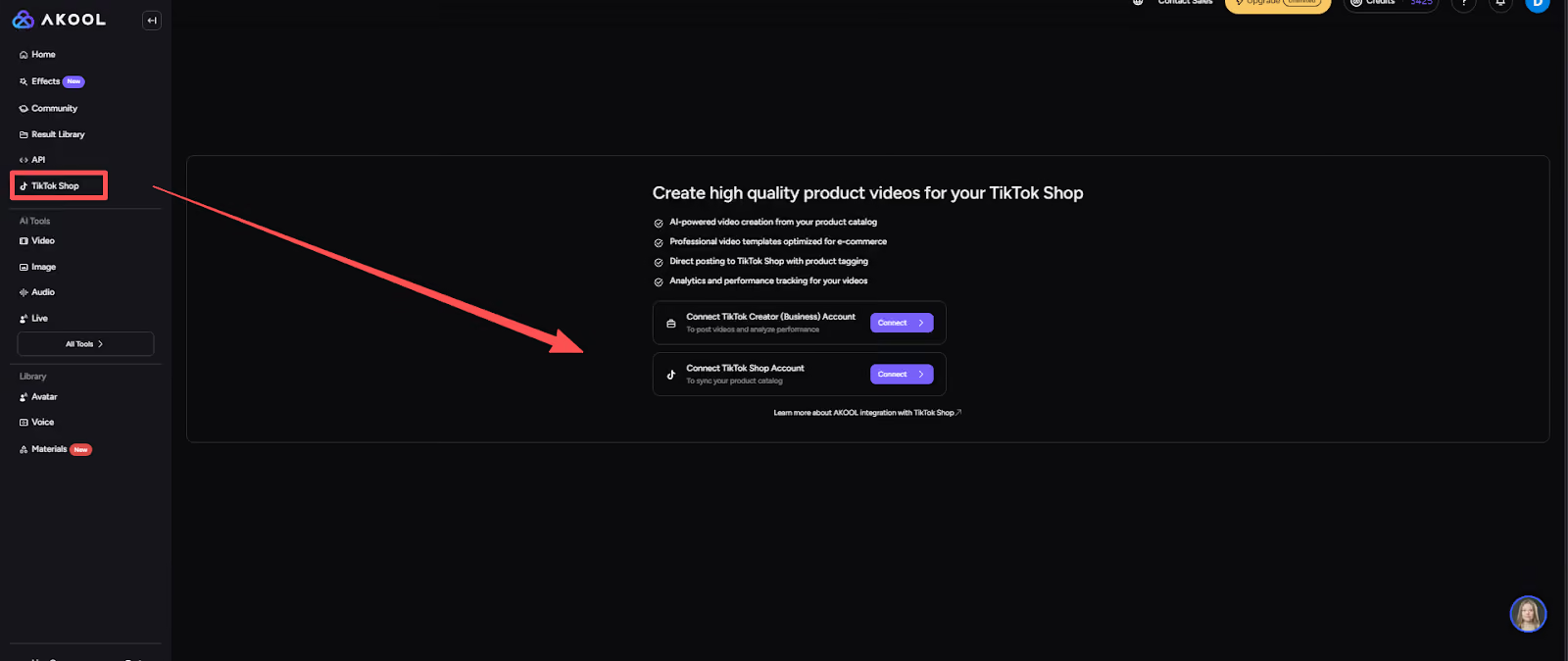
2. Complete TikTok Shop Authorization
- Connect your TikTok Shop account to Akool.
- Follow the authorization steps so Akool can:
- Access your TikTok Shop store
- Attach AI‑generated videos to your products
- Publish videos on your behalf (with your permission)
This is a one‑time connection that powers the rest of the workflow.
3. Select an Image
- Choose the product image or other visual asset you want to turn into a video.
- This can be a product shot, model photo, or brand image from your library.
The better and clearer the image, the stronger the AI video output.
4. Choose Image‑to‑Video or Talking Avatar
- Decide what kind of video you want:
- Image to Video – Animate the product with camera motion and visual effects.
- Talking Avatar – Turn a person or character in the image into a speaking host.
Selecting the right mode ensures Akool’s AI video generator builds the right style of content for TikTok Shop.
5. Enter Prompt Words to Generate the Video
- Add short prompt words or phrases to guide the video’s tone and purpose, such as:
- “product demo,” “quick review,” “unboxing vibe,” “limited‑time offer,” etc.
- Akool uses this to shape pacing, emphasis, and visual style.
Then click to generate. Akool will create the AI product video or talking avatar clip automatically.
6. One‑Click Publishing to TikTok Shop
- Preview the generated video.
- If it looks good, use the one‑click publish option to send it directly to your TikTok Shop:
- Attach it to a product listing
- Publish as a feed video promoting your item
Your AI‑generated video is now live where it matters—right in front of TikTok shoppers.
Conclusion
The Akool TikTok Shop integration bridges the gap between AI creativity and real e‑commerce results. By turning simple product images into AI‑generated videos and talking avatar clips, then publishing them to TikTok Shop in a single workflow, Akool helps you:
- Produce more product videos with less effort
- Stand out in the TikTok feed with dynamic, AI‑driven content
- Move faster from idea to live shoppable video
If you’re serious about growing your sales on TikTok Shop, this integration gives you a major advantage: AI product videos and talking avatars tailored for TikTok, delivered in just a few clicks.


