


Introduction to Nano Banana 2
Nano Banana 2 is Google’s newest AI image model, built to deliver pro‑quality image generation with Flash‑tier speed while improving instruction following, subject consistency, and production‑ready output.
It’s also commonly referred to as Gemini 3.1 Flash Image, and it brings advanced capabilities previously associated with higher‑end image models into a faster, more scalable workflow.
For creators and marketing teams, the appeal is simple: generate and edit images faster, keep visuals more consistent across variations, and produce text‑heavy marketing creatives (posters, banners, infographics) with fewer re‑rolls and less cleanup.
Key Features and Major Upgrades in Nano Banana 2
1) Pro‑quality output at Flash speed
Google positions Nano Banana 2 as a model that combines “Pro capabilities” with “lightning‑fast speed,” closing the gap between high fidelity and fast iteration.
What that means in practice:
- Faster concepting and iteration for content generation
- More usable first outputs for marketing creatives
- Less time spent “prompt‑lottery” testing tiny variations
2) Native multi‑resolution output up to 4K, with aspect ratio control
Nano Banana 2 supports flexible sizing from 1k up to 4K, with user control over aspect ratios. This is especially useful for teams producing multi‑channel assets (vertical stories, square social posts, wide hero banners).
3) Better instruction following and stronger subject consistency
A major upgrade is tighter adherence to complex requests and improved consistency in multi‑subject scenes. Google highlights “subject consistency and precise instruction following,” and third‑party coverage notes it can maintain scenes with up to five characters and 14 objects more reliably in a single workflow.
This is a big deal for:
- Campaign visuals where the “main subject” can’t drift
- Product scenes that need repeatable composition
- Storyboard sequences that require character stability
4) Accurate typography and localization for text‑heavy visuals
Nano Banana 2 improves in‑image text rendering and supports localization use cases. Google explicitly calls out upgraded text rendering and localization, and coverage highlights legible text as a differentiator for infographics and marketing mockups.
If you build:
- Social ads with headlines
- Posters with offers and CTAs
- Infographics and diagrams
…this is one of the most practical upgrades.
5) Web‑grounded generation and improved “world knowledge”
Nano Banana 2 can optionally use web search grounding to generate more current, context‑aligned visuals. Google’s developer notes describe “improved world knowledge” and using web search images for more detailed, real‑world depictions.
Use cases include:
- Trend‑aware creative themes
- Location‑inspired visuals
- Data and diagram concepts that benefit from current context
6) Semantic image editing that preserves what matters
Beyond text‑to‑image, Nano Banana 2 also supports AI image editing workflows that follow natural language instructions and preserve the rest of the composition.
On supported implementations, Nano Banana 2 editing can:
- Understand edits “semantically” (what to change vs what to keep)
- Support multi‑image compositing with up to 14 reference images
- Maintain coherence in lighting, composition, and style during edits
This is especially valuable for:
- Product retouching and variant generation
- Background swaps and scene rebuilds
- Rapid creative remixing for A/B tests
How to Use Nano Banana 2 in Akool
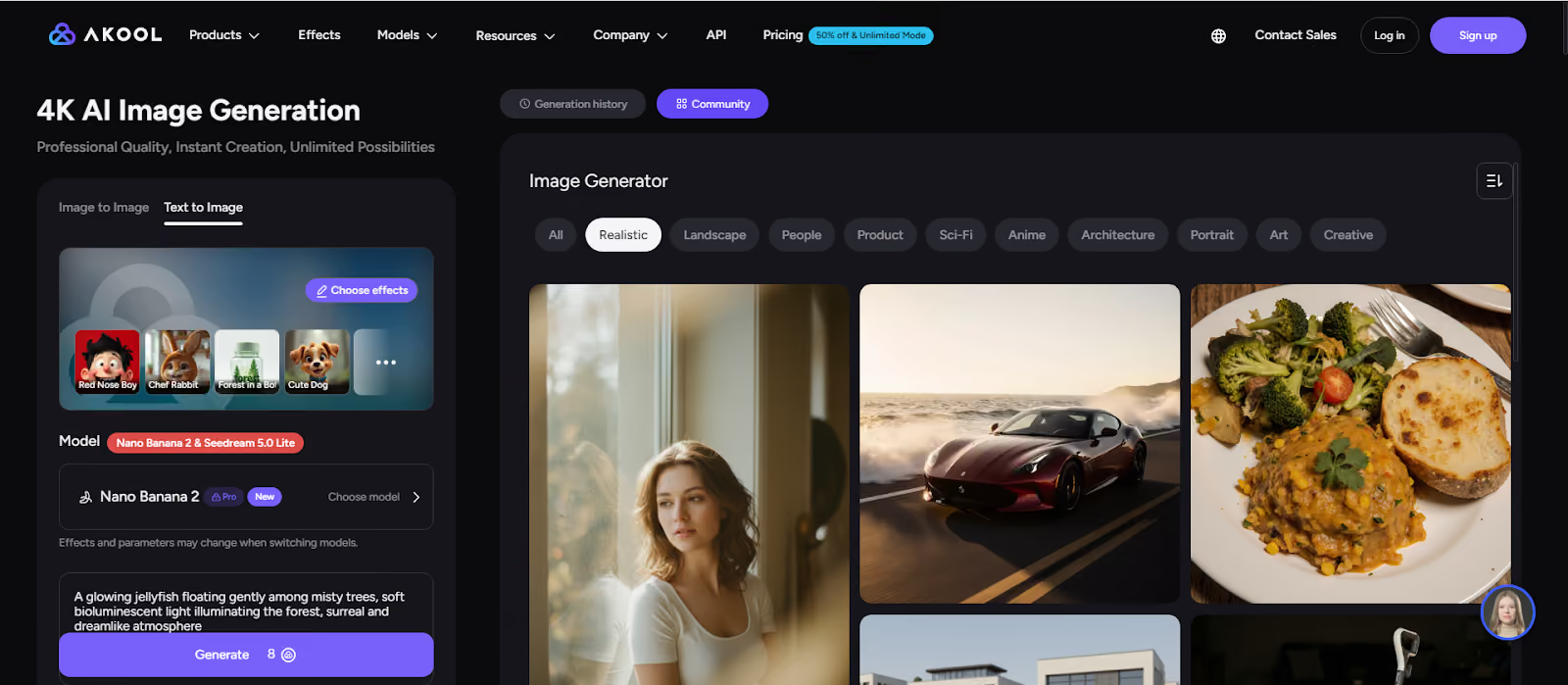
Nano Banana 2 is available in Akool’s Image Generator, where you can create images from text or transform existing images.
Step 1- Open Akool’s Image Generator
Go to Akool and open the Image Generator tool.
Step 2- Choose your mode
Akool supports:
- Text to Image for new generations
- Image to Image for transformations and creative edits
Step 3) Select the Nano Banana 2 model
In the model selector, choose Nano Banana 2 (shown alongside other models like Seedream 5.0 Lite).
Step 4- Add an optional reference image
If you want stronger visual control, add a reference image (Akool currently shows up to 1 reference image in this flow).
This helps when you need:
- A specific look or vibe
- Consistent subject framing
- A product photo to guide composition
Step 5- Write your prompt and generate
Enter a clear prompt and click Generate (Akool can generate multiple images per run).
Prompt tips that work well for AI image generation:
- Include output type: “poster,” “infographic,” “product hero,” “social ad”
- Specify layout: “space at top for headline,” “centered product,” “clean background”
- Add style cues: lighting, lens, material, color palette
Step 6) Iterate and export
Pick the best result, refine your prompt or reference, regenerate, then export the final asset for ads, social content, landing pages, or ecommerce visuals.
Conclusion
Nano Banana 2 is a major step forward in AI image generation and AI image editing: Flash‑speed creation, 4K output, stronger instruction following, more consistent multi‑subject scenes, improved typography, and optional web‑grounded relevance.
If you need faster, more controllable text‑to‑image and image‑to‑image workflows for marketing creatives, social assets, posters, and infographics, this model is built for exactly that.
Try Nano Banana 2 on Akool now and start generating high‑fidelity 4K AI images in minutes.


