


Introduction to Seedream 4.5
Seedream 4.5 is a next‑generation AI image model built to make the image generation process faster and more reliable. Instead of starting from a blank canvas, you give Seedream 4.5 a text prompt and optional reference images. The model then generates or edits images with high fidelity, staying very close to the structure, details, and style of your inputs.
Seedream 4.5 is an AI visual creation and image editing engine that turns your ideas and references into polished visuals with minimal manual cleanup.
Key Features of Seedream 4.5
1. Reference‑Accurate Visuals From Your Images
The standout capability of Seedream 4.5 is how precisely it can follow your reference images.
When you provide example visuals—such as a product angle, a character design, an interface layout, or a style reference—Seedream 4.5 can strictly preserve the details of the reference images instead of loosely copying the idea. That includes:
- Shape and proportions
- Colors, materials, and textures
- Key structural details and design elements
This makes Seedream 4.5 especially powerful for:
- Creating new scenes that stay consistent with your original concept
- Generating variations on a design while keeping core details intact
- Building series of images that share the same look and structure
If you remember one thing about this model, let it be this: Seedream 4.5 is built to respect your references, which is critical for dependable AI visual creation.
2. Multi‑Image Editing That Understands the Main Subject
Modern projects often involve sets of images, not just one: multiple views, different environments, or many versions of the same idea. Seedream 4.5 is designed to handle this with multi‑image editing.
The model can accurately identify the main subjects across multiple images. That means it understands which part of each image matters most—such as a product, a character, a device, or a key object—and keeps that subject stable while allowing you to change everything around it.
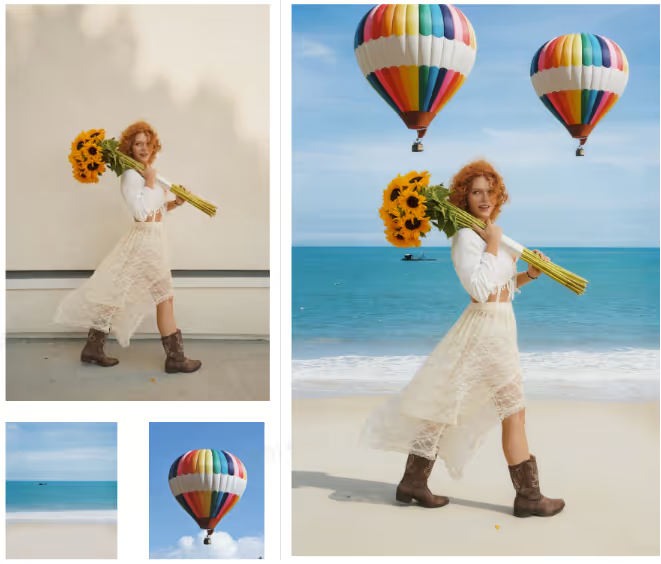
This is extremely useful when you want to:
- Swap or refine backgrounds while keeping the subject intact
- Apply style or lighting changes to a full series of images
- Generate multiple visual options around the same core subject
For anyone producing large batches of visuals, this feature turns multi‑image image editing into a faster, more controlled process.
3. Enhanced Typography and Dense Text Rendering
Text inside images is notoriously hard for many AI models. Seedream 4.5 addresses this by further enhancing typography and dense text rendering capabilities.
This means Seedream 4.5 is better at producing:
- Clear headings and subheadings
- Legible labels and UI text
- Tighter layouts that combine visuals and copy
Whether you’re designing social posts, simple ads, product mockups, or slide visuals, improved typography support makes it easier to use AI‑generated images directly, or with only small edits. This is a major boost for fast, text‑heavy content generation.
4. All‑Round Quality Improvements for AI Visual Creation
Beyond the headline features, Seedream 4.5 brings an all‑round improvement to image quality. You’ll see:
- More stable compositions and framing
- Fewer visual artifacts and distortions
- More natural lighting and shading
These improvements make the model a stronger foundation for everyday AI visual creation, helping you get closer to “ready to use” results with less post‑processing.
Why Seedream 4.5 Matters
In practical terms, Seedream 4.5 matters because it helps you create more, faster—without giving up control over how things look.
- Higher reliability:
Reference‑accurate outputs mean you can trust the model to respect your examples, saving time on corrections. - Faster content generation:
Combining multi‑image editing, better typography, and higher base quality lets you move from idea to usable visual much more quickly. - Flexible use cases:
Seedream 4.5 works across many scenarios: concept art, UI design, social graphics, simple product visuals, exploratory marketing creatives, and more.
Instead of treating AI as a rough sketch tool, Seedream 4.5 turns it into a dependable part of your production pipeline for image editing and creation.
How to Use Seedream 4.5 on Akool
We are excited to announce that Akool has integrated Seedream 4.5, bringing this cutting-edge visual technology directly to your creative toolkit.
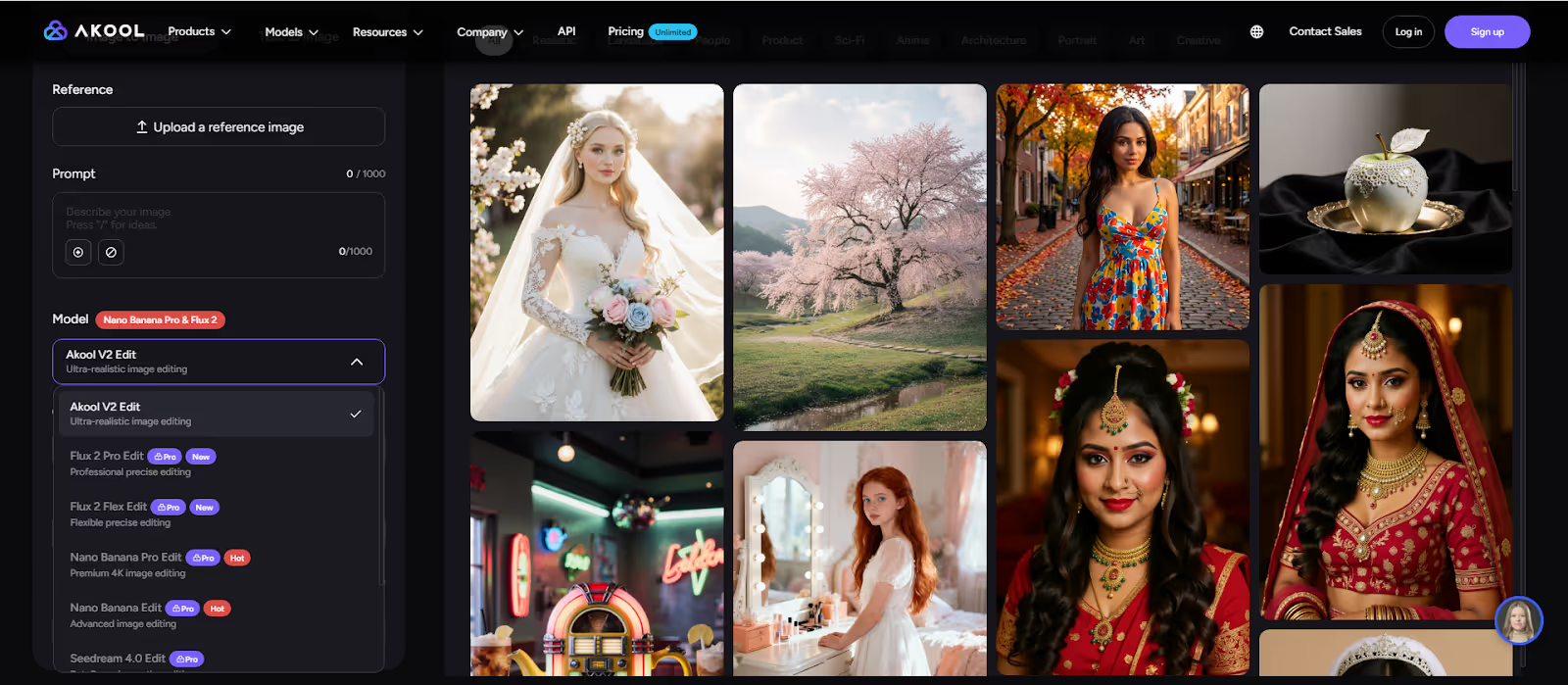
Here’s how to get started with Seedream 4.5 on Akool:
- Log in to Akool
Open the Akool platform and go to the Image Generator and select the Seedream 4.5 model. - Upload Reference Images (Optional but Recommended)
Add any visuals you want Seedream 4.5 to follow—such as layout examples, style references, or previous designs. - Write a Clear Prompt
Describe what you want: subject, style, mood, and any specific details.
Example: “Illustration of a workspace with a laptop and coffee cup, soft lighting, clean modern style for a blog header.” - Generate and Refine
Let Seedream 4.5 generate multiple options. Adjust your prompt, change references, or regenerate until you get what you need. - Export for Your Use Case
Download your images in the formats and sizes you need—for websites, decks, campaigns, or other marketing creatives.
With Seedream 4.5 built into Akool, you don’t need to manage models or infrastructure; you simply focus on content generation and visual ideas.
Conclusion
Seedream 4.5 is a powerful upgrade for anyone who relies on visuals: an AI image model that preserves reference details, understands main subjects in multi‑image editing, improves typography, and delivers higher overall quality for everyday AI visual creation and image editing. Integrated into Akool, it becomes easy to use as part of your regular workflow for fast, flexible content generation and marketing creatives.


