


The Video Revolution Is Now
AI has already transformed how we write, design, and edit images. Now it’s doing the same for video.
What if you could generate high‑quality, dynamic video from a simple text prompt?
That’s exactly what the Kling O1 video model is built for. Kling O1 is a cutting‑edge Kling O1 AI video system that can generate and edit video inside one unified engine—and now it’s available directly inside Akool, so you can actually use it in real campaigns, not just watch demos.
If you’re a content creator, video marketer, social media manager, digital agency, or brand strategist, Kling O1 on Akool gives you a powerful new way to create video at speed and scale.
What Is Kling O1?
Kling O1 isn’t just another AI video generator. It’s described as the world’s first unified multi‑modal video foundation model, designed to handle both video generation and video editing in a single system.
Instead of juggling separate tools for:
- text‑to‑video
- image‑to‑video
- reference‑to‑video
- video editing and shot extension
Kling O1 wraps all of this into one 7‑in‑1 engine that understands:
- natural language prompts
- images and reference frames
- video inputs
- motion, timing, and spatial layout
In plain language: you describe a shot (and optionally drop in reference images or clips), and Kling O1 turns that into a coherent, cinematic sequence—with built‑in tools to refine, extend, and edit the result.
Key Features & Capabilities of Kling O1
1. 7‑in‑1 Engine for Advanced Text‑to‑Video & Beyond
At the core of the Kling O1 video model is a 7‑in‑1 engine that unifies seven creative capabilities:
- Text‑to‑video
- Image‑to‑video (animate stills)
- Reference generation (using style/scene refs)
- Keyframe creation
- Content add/remove
- Style transformation
- Shot extension
On Akool, this means you can:
- Start from text only to get a first draft
- Animate a product image or brand visual with image‑to‑video
- Use reference clips and keyframes to guide style and motion
- Extend a good shot into a longer sequence without rebuilding from scratch
Kling O1 generates 5–10 second clips by default and can extend them up to 2 minutes while preserving coherence and style.
For creators, that’s everything from quick social clips to explainer sequences—all from the same model.
2. Chain‑of‑Thought Motion & Physics Understanding
A standout feature of Kling O1 AI video is its use of Chain‑of‑Thought (CoT) reasoning for text‑to‑video. Under the hood, Kling O1 “thinks through” your prompt in steps before rendering, which leads to:
- Better motion accuracy (how characters move, how camera behaves)
- More precise prompt interpretation (it actually follows complex instructions)
- More natural physics simulation (objects feel grounded, not floaty)
From your perspective, you just experience smoother, more believable clips where:
- Camera pans feel intentional
- Character actions match your description
- Temporal sequences (how things change over time) make sense
When you combine this with Akool’s workflow, you get a video creation AI that’s much closer to how a real director and camera crew would think.
3. High Visual Fidelity: 1080p-4k with Native Audio
Kling O1 is designed for production‑ready quality:
- Supports 1080p, 2k and 4k video output
- Generates 5–10 second HD clips, extendable up to 2 minutes
- Offers rich details, realistic lighting, and smooth motion out of the box
On top of visuals, Kling O1 also includes native Kling‑Foley audio—a built‑in audio engine that creates frame‑perfect synchronized sound effects and music to match your video.So instead of silent footage, you can:
- Generate clips that already feel like mini finished pieces
- Get ambient sound, effects, and musical cues that fit the motion
- Spend less time sourcing generic stock audio
When routed through Akool AI, you can always layer your own audio if needed, but Kling O1 gives you a surprisingly strong starting point.
4. Complex Scene Composition with Multi‑Elements & References
Kling O1 is built for complex, real‑world creative work—not just one‑off shots.
Key capabilities that matter for your workflows:
- Multi‑Elements editing mode
Combine existing video with text prompts to perform sophisticated edits: object replacement, style changes, background swaps, weather changes, and more—without traditional VFX timelines. - Up to 10 reference images
You can attach up to 10 reference images (characters, products, environments) and refer to them directly in your prompt. - Shot extension & long‑form coherence
Start with a 5–10 second clip, then extend it up to 2 minutes while maintaining consistent characters, style, and narrative—ideal for explainers, promos, and story‑driven content.
This is where Kling O1 really becomes a unified video & edit model: it lets you generate, refine, and extend in one continuous workflow.
Why This Changes Everything for Creators (The “Why”)
Democratizing High‑End Video Production
Before tools like Kling O1, cinematic video usually required:
- A full crew and gear
- Locations and lighting
- Editors, compositors, and lots of time
Now, with Kling O1 AI video inside Akool, a solo creator or small team can:
- Generate 1080p clips from a text prompt + a few references
- Add synchronized audio automatically
- Edit and extend those clips with natural language
You still decide the story and creative direction—but the heavy lifting of production is handled by the model.
Unprecedented Speed & Scalability
For content creators, agencies, and marketing teams, speed is everything.
Kling O1 on Akool helps you:
- Go from idea → draft → iteration in a single working session
- Generate multiple creative directions or hooks for A/B testing
- Quickly reshoot (regenerate) scenes instead of re‑booking crews
That means more experiments, more content, and more chances to hit the right message—with far less friction.
Fueling Creativity & Experimentation
Lower cost + higher speed = more freedom to try things.
With Kling O1 and Akool AI video, you can:
- Prototype campaign concepts without committing to full production
- Explore new visual styles, angles, and moods
- Build storyboards and pitch videos that already feel “real”
Because you’re not locked into expensive shoots, you can take more creative risks—and refine only what actually lands with your audience.
Your Gateway to Kling O1:
Here’s the key: Akool has integrated the powerful Kling O1 video model into its suite of AI creative tools.
That makes Akool the practical gateway to Kling O1 for:
- Content creators & influencers
- Video marketers & social media managers
- Digital agencies & in‑house brand teams
With Kling O1 running inside Akool AI video you get:
- No‑code access to Kling O1’s 7‑in‑1 engine in a clean, visual UI
- End‑to‑end workflow: prompt → generate → edit → brand → export
- The ability to combine Kling O1 with Akool’s other tools (overlays, templates, brand elements) in a single place
Instead of managing multiple platforms, you log into Akool and use Kling O1 as part of a unified AI video production environment.
Getting Started with Kling O1 on Akool
Here’s a simple path to your first Kling O1 AI video on Akool:
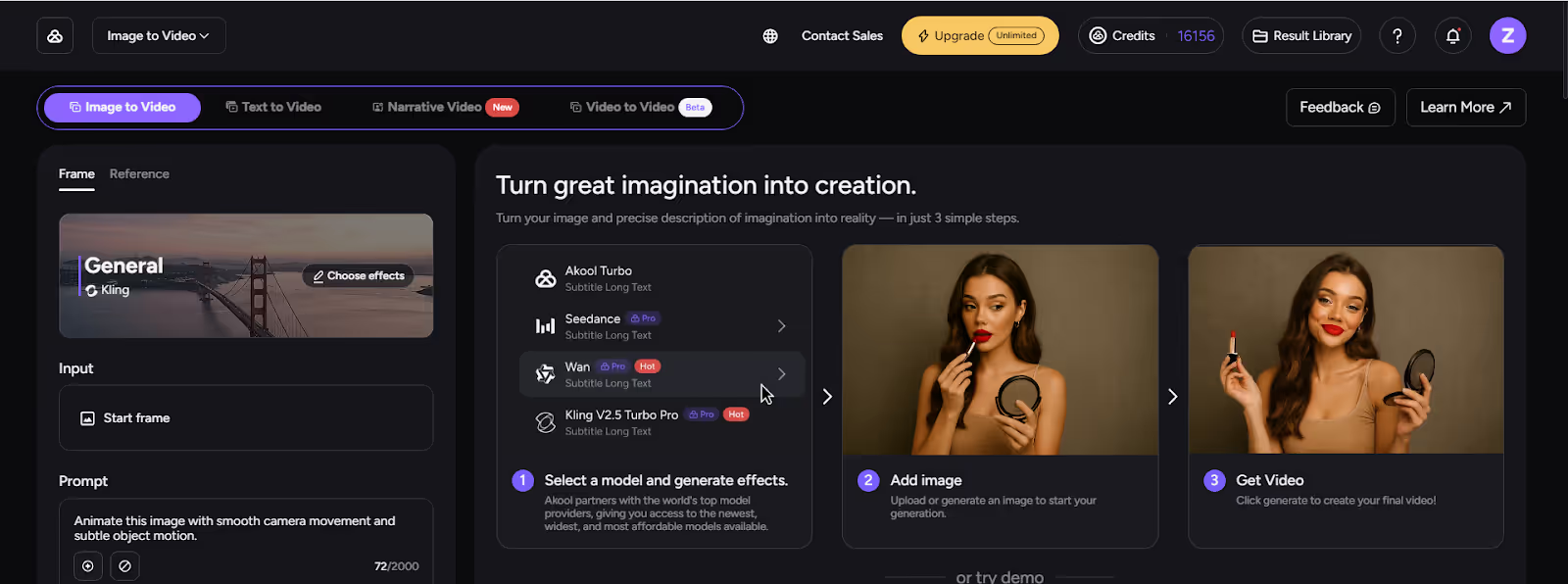
- Visit Akool
Log in or sign up on the Akool platform. - Open the AI Video / Kling O1 Section
Navigate to the image to video where Kling O1 is available as a model option. - Enter Your Prompt
Be descriptive—include subject, action, style, camera motion, and mood.
Example: “Cinematic 9:16 video of a sneaker landing in slow motion in a puddle, neon reflections, dramatic backlight, 1080p, 5‑second shot.” - Choose Mode & References
- Text‑to‑video for fast concepts
- Image‑to‑video to animate product or brand visuals
- Video edit / Multi‑Elements to modify existing footage
- Generate, Review, and Refine
- Let Kling O1 create the initial clip
- Adjust your prompt or add references for tighter control
- Use Akool’s editing and branding features to polish the result
- Export & Publish
Download your video in the right format and resolution, then publish across TikTok, Instagram, YouTube, ad networks, or your website.
After a few runs, you’ll start building your own “recipes” for prompts and styles that fit your brand.
Conclusion
The Kling O1 video model is a major leap in text-to-video AI—a unified, multi‑modal engine that combines generation, editing, and shot extension with HD quality, CoT reasoning, and native audio.
With its integration into Akool, you don’t need technical skills or a massive budget to use it. If you can describe a scene, you can create it.
The future of AI video creation isn't just on the horizon—it's live and ready for you to explore. Start generating groundbreaking videos today.
Experience the power of Kling O1 on Akool.


